

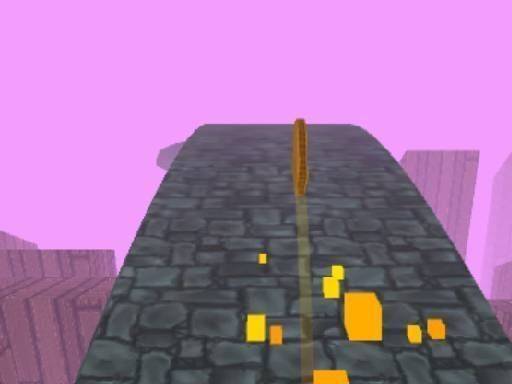
Track Navigator: Rolling Disc Puzzle
Reviews
Track Navigator offers a satisfying blend of physics and strategy. The track layouts are creative, with obstacles that require thoughtful planning rather than quick reflexes. The controls are responsive and allow for precise movements. The clean visuals and lack of timers make it a stress-free experience. While the core concept is simple, the variety in level design keeps it engaging. It is an excellent choice for puzzle fans looking for a calm but rewarding challenge.
About This Game
Core Gameplay Loop
In Track Navigator, the player controls a small disc rolling along a track. The primary objective is to steer the disc into a designated hole at the end of each path. The track is not a straight line; it twists, turns, and includes various obstacles that require precise timing and gentle input. The physics engine simulates momentum and friction, so the disc does not stop instantly. This means players must plan their movements ahead of time, adjusting speed and direction smoothly to avoid falling off the track or hitting hazards.
Track Layout & Obstacles
Each level presents a unique track layout. Obstacles include sharp spikes that can stop the disc, rotating gates that open and close, and hidden passages that change the route. Speed ramps are placed along the track to launch the disc forward, but using them requires careful timing to avoid overshooting the target. The variety of obstacles means no two levels feel the same, and players must adapt their strategy for each new configuration.
Visual Style & Accessibility
The game uses a clean, colorful art style that is easy on the eyes. The tracks are clearly visible against the background, and obstacles are color-coded to indicate danger or function. This design makes the game accessible to players of all ages, including younger children and those with visual sensitivities. The interface is minimal, with only essential controls on screen, reducing clutter and distraction.
Control Mechanics
Players can control the disc using touch on mobile devices or a mouse on desktop. The controls are responsive and allow for fine adjustments. Tilting or dragging the disc changes its direction, while tapping or clicking can apply a small speed boost. The game encourages gentle, precise movements rather than fast reactions. This makes it a relaxing experience that still requires focus and planning.
Progression & Replayability
Levels are arranged in a linear progression, with each new stage introducing more complex track designs. There are no timers or score limits, so players can take as long as they need to complete each puzzle. This removes pressure and allows for thoughtful play. The game may include optional challenges, such as completing a level without touching any obstacles, which adds replay value for those seeking extra difficulty.






Comments
0 comments