

Giant Wheel Driving Adventure
Reviews
Giant Wheel Driving Adventure succeeds by focusing on clear objectives and gradual progression. The three environments each present unique driving challenges, from sand traps to narrow mountain paths. Upgrading tires and speed boosts feels meaningful, as these changes directly affect how your vehicle handles. The controls are simple enough for a child to pick up, but mastering jumps and tight turns takes practice. This balance makes it a solid choice for family play sessions.
About This Game
Vehicle Selection & Customization
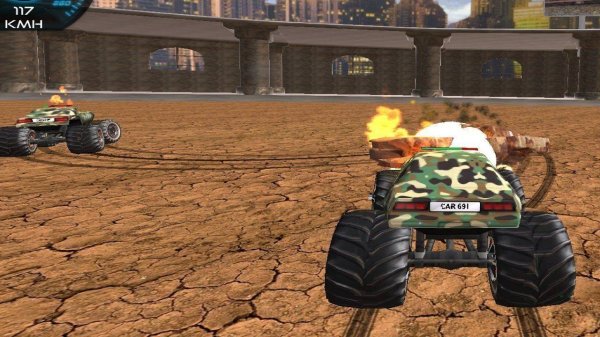
Players begin by choosing from a garage filled with large-wheeled vehicles, each with its own visual style. As you progress, additional models become available, offering different handling characteristics. The upgrade shop allows you to improve tires for better grip on loose surfaces and install a temporary speed boost to clear difficult sections. These enhancements directly affect how your vehicle performs on each course, encouraging thoughtful decisions about which upgrades to prioritize.
Course Design & Environment Variety
Courses are set in three distinct areas: a dry desert with steep dunes, a mountainous region with narrow paths, and a cityscape with ramps and tight corners. Each environment requires a different approach. Desert stages reward careful throttle control to avoid sinking into sand, while mountain courses demand precise steering to stay on narrow ledges. City levels introduce elevation changes and man-made obstacles that test your ability to maintain momentum through sharp turns.
Objective System & Progression
Rather than simply crossing a finish line, each course presents specific tasks. You might need to collect items scattered across the map, reach a certain height during a jump, or complete a route within a time limit. Successfully meeting these goals earns points that unlock new vehicles and upgrades. This structure gives each run a clear purpose and encourages replaying familiar courses to improve your performance.
Control Scheme & Accessibility
The controls are designed to be intuitive for new players while offering enough depth for experienced drivers. On a keyboard, arrow keys manage acceleration, braking, and steering. Touchscreen devices provide on-screen buttons. A dedicated button activates the temporary speed boost, which recharges over time. The simple layout means that even young players can quickly learn to drive, yet mastering the timing of jumps and boost usage provides a satisfying challenge for older players as well.
Comments
0 comments