

Traffic Dash Arcade Racer
Reviews
Traffic Dash Arcade Racer delivers a straightforward driving challenge that is easy to pick up. The controls are simple, and the coin collection system adds a rewarding goal. Unlocking new car skins keeps the experience fresh. The game runs smoothly in a browser with no download, making it ideal for short breaks. It is family-friendly and suitable for all ages.
About This Game
Game Introduction
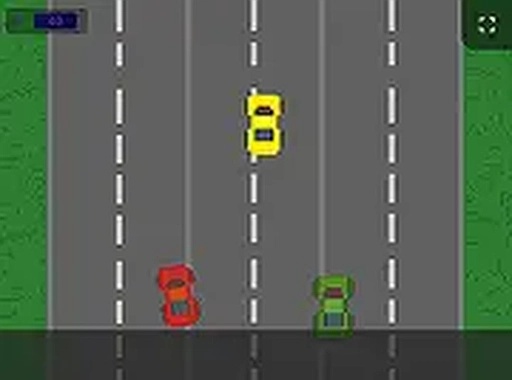
Traffic Dash Arcade Racer is a driving game where players control a vehicle moving along a busy road. The main goal is to steer clear of oncoming traffic while gathering as many coins as possible. Coins collected can be used in the in-game shop to unlock a variety of new skins for your car, allowing you to customize its look. This game is designed for casual players and driving fans alike. It offers endless entertainment with no downloads required. The family-friendly content makes it a safe choice for players of all ages. With simple controls and progressively harder levels, Traffic Dash provides a satisfying challenge that keeps you engaged.
How to Play
Playing Traffic Dash Arcade Racer is straightforward. On desktop computers, use the arrow keys or WASD keys to steer your car left and right, avoiding incoming vehicles. On mobile devices, tap the left or right side of the screen to move your car in that direction. As you drive, watch for shiny coins on the road. Collect them to increase your score and save up for new car skins. The game becomes more challenging as you progress, with more traffic and faster speeds. If you crash into another car, the game ends, and you can try again to improve your score. For a more immersive experience, you can switch to full screen mode. There is no time limit, so you can play at your own pace.
Game Features
Fun driving gameplay that is easy to learn. Coin collection system that rewards your progress. Unlockable car skins for personalization. Mobile-friendly controls for play on any device. Full screen mode for a better view. Free to play with no downloads.
Tips for Success
To improve your score, focus on staying in the center of your lane to give yourself more reaction time. Practice recognizing the pattern of oncoming traffic to anticipate swerves. Prioritize collecting coins, but never risk a crash for a single coin. As you unlock new car skins, you may find that different designs help you stay motivated. Finally, take short breaks if you feel your focus slipping, as the game rewards steady concentration.






Comments
0 comments